What’s this for?
Sometimes you might need a simple way of monitoring requests that WordPress is serving. Here’s one way that I might do it, since I usually have Redirection installed. In this post, I’m assuming the plugin is installed, activated, and set up.
Warning!
This will log every public request to your site, which will store a lot of data in your database. Do not leave this on.
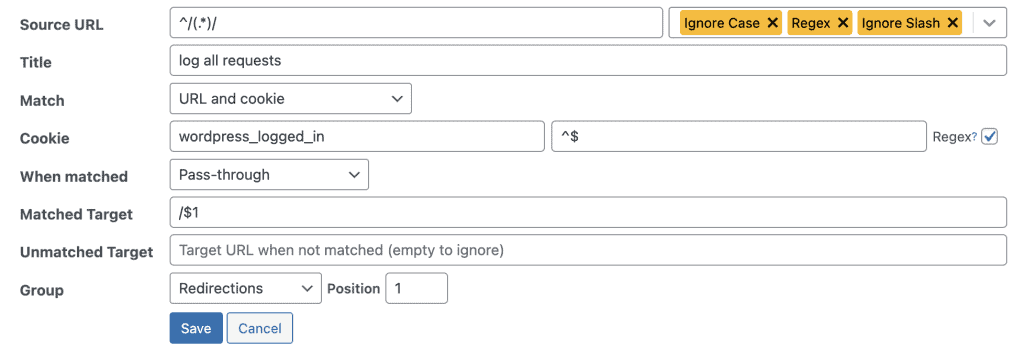
Explination
Source URL
This is a regular expression (regex) that matches all URLs. The regex ^/(.*)/ breaks down as follows:
• ^: The start of the string.
• /: The initial slash in a URL.
• (.*): Captures any characters following the initial slash, essentially matching any path or file.
• /: Ensures the URL ends with a slash.
• This field is meant to capture any URL request on the site to handle them for logging purposes.
Title (log all requests)
For your reference
Match: (URL and Cookie)
We match the URL, but also a cookie to prevent this from running for logged-in users
Cookie (wordpress_logged_in)
we exclude logged-in-users with another regex match that only matches no characters. If a visitor has any value set for the cookie wordpress_logged_in, this match is false.
When Matched (Pass-through)
Defines the behavior of the redirect when a request matches the conditions. “Pass-through” means that instead of performing a redirection, the request is allowed to continue as usual. However, because this rule is set up to log requests, the main purpose here is to monitor or log the access without changing the user’s browsing experience.
Matched Target (/$1)
Specifies the target URL when the conditions are met. $1 refers to the capture group from the Source URL regex ((.*)), which passes the original requested URL unchanged. In essence, this does not alter the path and just allows the request to proceed as it would without the rule.
Unmatched Target (empty)
Defines what to do if the URL or conditions do not match. Since this field is left empty, no action is taken for unmatched requests, and they are ignored by this rule.
Group (Redirections)
Organizes the rule within a particular group. The “Redirections” group is a default or custom group in the plugin where this rule is categorized. This helps with managing multiple rules and keeping the redirect rules organized.
Position (1)
Indicates the order in which this rule will be evaluated among other rules within the same group. Position 1 means it has the highest priority and will be the first rule checked for matches in the “Redirections” group.
Summary
This rule is designed to log all URL requests that come with the wordpress_logged_in cookie, effectively tracking all activity from logged-in users. The “Pass-through” setting ensures the request proceeds without interruption, while the actual logging can be handled for debugging or testing without affecting the user’s experience.
Leave a Reply